

 Audio 2G
For several years now, we have been hearing about streaming music, a very practical system of listening to music and especially accessing an almost infinite number of titles in every genre of music. The downside is the need for a streamer (a device that allows access to the various platforms such as Qobuz, Tidal and others upon payment of a subscription) and another device that will have the task of converting the data downloaded from the network into an analog signal… the infamous DAC (Digital to Analogue Converter). And this is where it can be pains because in order to get good quality the costs rise. In this article we will see how a simple Rspberry equipped with Ian Canada boards can solve the problem.
IAN CANADA: here's what to know
Many users have turned to cheap systems, foremost among them, even chronologically, the use of a Raspberry PI on which one can mount small DACs whose quality, though improved over the years, nevertheless remains quite modest. I too have not been immune to this “line of research,” getting generally disappointing results. So I got busy researching on the web, both on YouTube and on international forums until I came across a DIY (Do It Yourself) site where I discovered that there is a small company in Canada, IAN CANADA, which has dedicated itself to elaborating, designing and building a whole series of very well-made boards that allow one to assemble very good quality DACs and Streamers while investing more than affordable amounts of money. After careful study of the IAN Canada catalog, I decided to try to go down this road by making a Streamer/DAC based on such boards to which I added a Raspberry PI 4B.

Technical Analysis: power supply
The first thing I had to address was the power supply, both of the Raspberry and the Hat boards that would make up the “accrocchetto” (I like to call it that), so I used a Pure Pi II by Ian Canada. Let’s see what it is: PurePi II is a compact-sized dual-stage power supply combination specifically designed for Raspberry Pi audio applications to improve their sound quality. PurePi integrates a 5 V supercapacitor power supply and a 3.3 V isolated pure battery power supply placed on a single PCB. With spring contacts, it is very easy to install a Raspberry Pi and other audio HATs on top of the PurePi without the need for additional power connectors. Definitely a great idea and moreover at a low cost: €125.00
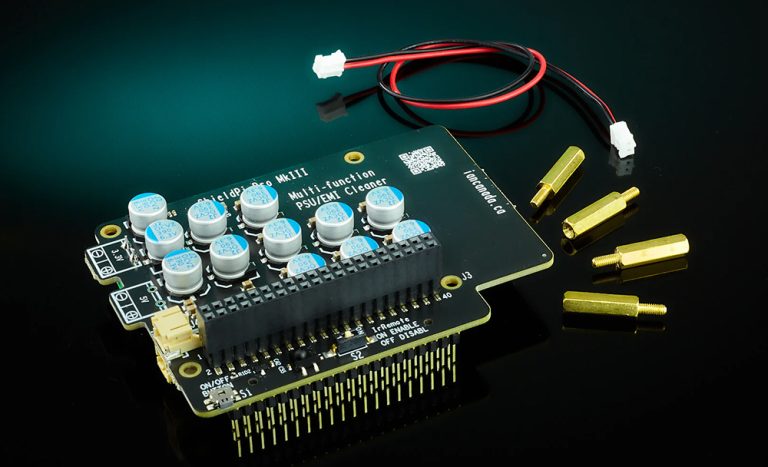
Once the Pure PI II was installed on the Raspberry, I decided to achieve further purification of the supplied power supply, while interposing a shield for RF radiation that might negatively interfere with the DAC board, by installing a Shield PI Pro by Ian Canada . Let’s see what it is: ShieldPi Pro is suitable for all RespberryPi applications to reduce EMI noise and improve power supply performance. Installation of this additional board is very simple and is done through the GPIO connector of the RaspberryPi. Cost approximately €49.90.
Technical Analysis: DAC of IAN CANADA
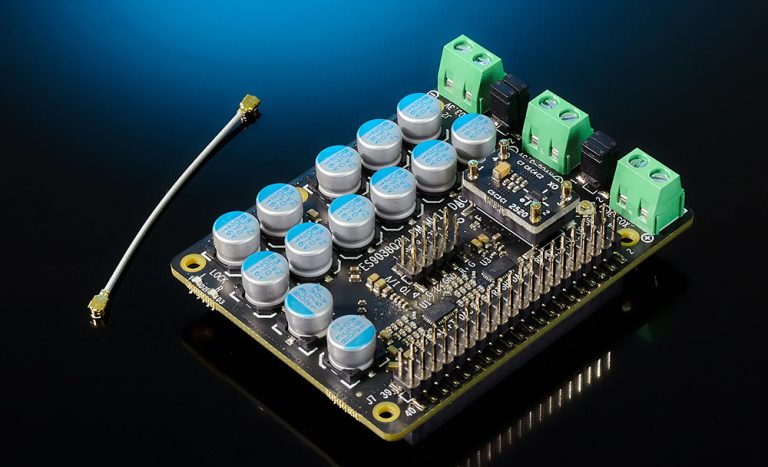
Let us now turn to the DAC board that I installed on the board described above. It is an ES9038Q2M Dual Mono II DAC HAT based on ESS SABRE 32 reference technologies. It has an excellent price/performance ratio and constitutes an excellent choice for a project such as the one we are describing at a still reasonable cost. It can perform its function as a DAC in the default ASRC mode or in advanced Clock SYNC mode when combined with a FifoPi module, the features of which are detailed below:
- 32bit SABRE32 DAC with dual-mono architecture;
- Supports up to 768KHz 16/24/32bit PCM, native DSD1024 and DSD256 via DoP and S/PDIF;
- SYNC and ASRC dual clock mode;
- External synchronous clock range from 22.5792 MHz to 98.3040 MHz. Or asynchronous internal clock from 100 MHz;
- Control and storage of settings via external ESS controller or MonitorPi Pro;
- The controller operates in isolated mode when used with FifoPi to eliminate ground loop and EMI noise;
- The raw balanced current output allows the use of a variety of external output stages such as Transformer I/V, standard OPA I/V, or OPA861 zero feedback I/V balanced;
- The dual mono configuration can provide an ultra-low output impedance of 389 ohms to achieve a much higher dynamic output current than the normal single-chip configuration;
- 3.3 V direct power inputs;
- Independent locking LED indicators for the left and right DAC chips;
- It can automatically switch between PCM, DSD, DoP and S/PDIF;
- The XO socket design allows you to exchange/upgrade to a better quality local Clock;
- Very easy to switch to SYNC mode by simply removing the local XO from the socket and connecting a U.FL MCLK cable;
The cost of this card is also relatively low, coming in at €135.00.

Technical Analysis: Clock
As for the Clock I opted to use an external one since the DAC board seen above offers such a connection opportunity. The only expedient is to remove the XO oscillator already mounted and connect it with the appropriate cable to the external clock unit. Also in this case I used a component of Ian Canada and precisely the FifoPi Q7II Flagship I2S/DSD/DoP FIFO with isolator, re-clocker and ultra-low-phase noise XOs of which we detail the characteristics as reported by the manufacturer’s site:
- Synchronous clock mode for the best possible sound quality;
- Next-generation 32-bit FIFO engine architecture with a large 64 Mb FIFO memory;
- Equipped with renowned low-noise 3-stage discrete 1-bit re-clockers to ensure the best I2S/DSD signal quality. The output I2S/DSD signals are nearly perfect in terms of signal integrity;
- Integrated optical discrete digital isolators to ensure the best isolation performance and minimum EMI loss;
- Supports I2S input/output up to 768KHz;
- Supports native DSD input/output up to DSD 1024;
- The on-board DoP decoder can play Raspberry Pi’s native DSD on GPIO up to DSD256;
- Delay time programmable from 0.1 to 1 second;
- The Advanced variable depth FPGA algorithm automatically adjusts the memory FIFO based on sampling frequencies to maintain the same delay time constant across different audio formats and frequencies;
- The continuous clock mode allows the current output clocks to be maintained without any change until a new sample rate is latched. This function can keep the noise (pop) of the DAC as low as possible when the music signal starts/stops/changes even in the absence of a MUTE control;
- A MonitroPi module can be used as a FifoPiQ7 controller.
- It works with the touch screen of StationPi Pro;
- Two upgradable/replaceable XO sockets mounted local low phase noise clocks (XO or OCXO, with/without OE pins) support frequencies from 5.6448 MHz to 89.304 MHz and for both 44.1 and 48 sampling frequency families
- Works with SinePi to use high-quality external sinus clocks;
- Two separate DC inputs to provide both clean power to FiFoPi Q7 and optional Raspberry Pi power supply via GPIO;
- The 3.3 V ultracapacitor or LifePO4 battery power supplies can be fed directly to the clean side of FifoPiQ7;
- Optimized wide-bandwidth decoupling networks improve feeder performance the most;
- The non-isolated GPIO connector is designed to install DAC controllers (MonitorPi or other RPi accessories) in isolated mode without affecting the signal quality of the isolated outputs;
- FIFO memory functions as a clock isolator on two clock domains to synchronize I2S/DSD signals with MCLK of XO oscillators;
- It has three output groups: coaxial U.FL, GPIO and AUX GPIO connectors. They are all independent of each other;
- There is no need for a Linux driver. It can also be used for free Raspberry Pi applications;
- It can work with all kinds of digital audio sources such as USB, S/PDIF, StationPi, StationPi Pro and so on;
- Internal hardware 16- to 32-bit lossless converter.
The Cost of this sophisticated component is € 265.00
Technical Analysis: Control Unit of IAN CANADA
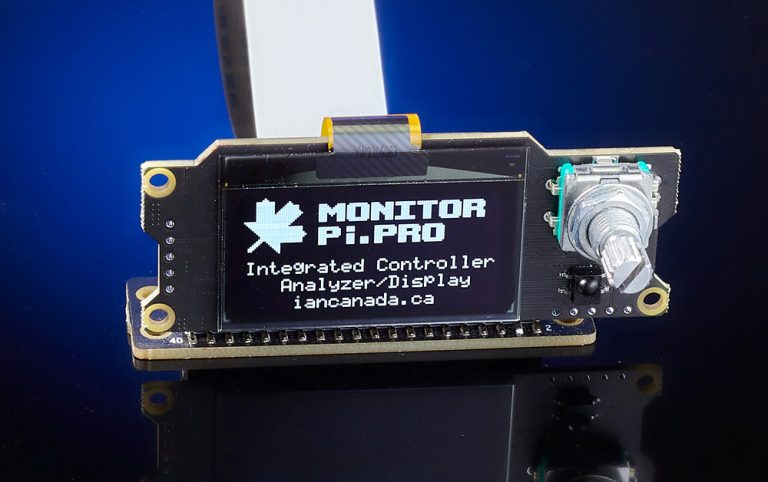
At this point we need a device to configure and control the DAC/Streamer we have assembled. I relied on the MonitorPi Pro which is in fact a powerful integrated control center as well as a universal OLED display panel that works for all kinds of Raspberry Pi audio applications. It also features a rotary encoder that allows you to browse through the various pages of the settings menus and view playback data (file type, Clock frequencies, etc.) To install a MonitorPi Pro, all you have to do is simply plug it into the GPIO port. Benefiting from the unique built-in high-speed signal analyzer, MonitorPi Pro detects the digital audio format and I2S/DSD signal status in real time and displays the music information on the OLED screen.
In addition, as a built-in controller, it functions as a kind of “bridge” that can connect many different boards to make a very complex system. MonitorPi Pro can also support free RaspberryPi applications.
The cost of the component is €95.00.
Technical Analysis: Audio Interface
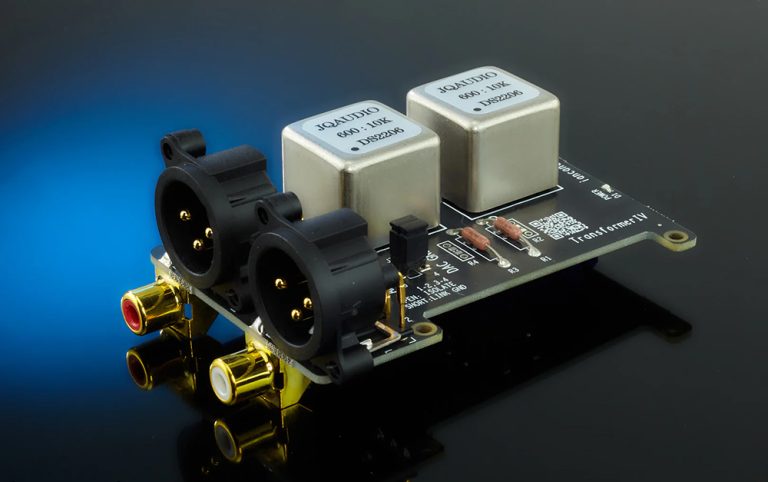
The last “ingredient” in our Super Raspberry is the audio output interface. In this specific case I chose to use the Transformer I/V interface, which operates in pure passive mode without any feedback, no active components and therefore no power supply required. I point out that in the Ian Canada catalog there are other interesting solutions for this functionality, including some active boards based on the use of Op Amp that allows an additional level of tweaking as noted during the recently published test of the Fosi Audio ZD3 DAC. The decision to use a transformer interface was motivated by the desire to achieve as much analog sound as possible. Unlike traditional active solutions, the Transformer I/V reproduces music very naturally and analogically with a “signature” sound that, in my opinion, will be appreciated by many audiophiles more accustomed to traditional sounds.
The Cost of the component is € 119.00.
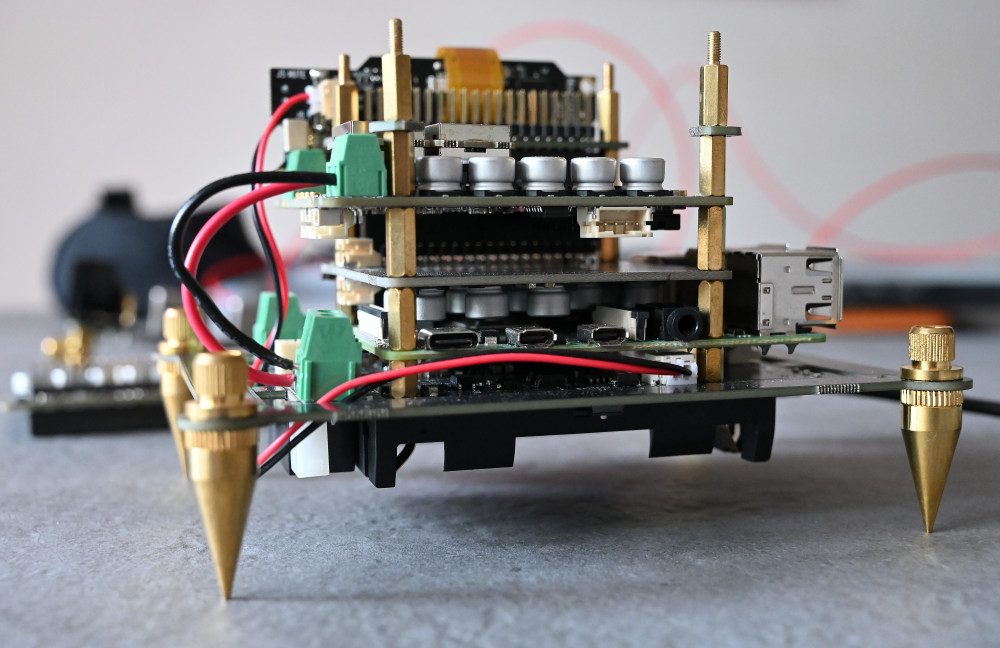
The Super Raspberry at the listening test
But let us now see how the system we have just described sounds. After about twenty minutes of the first power-up the system goes into full operation, so rechargeable batteries, supercapacitors, and operating clocks. The latter need a short break-in period for them to express themselves properly–say about ten hours or so. I opted for a balanced connection to the input of my amplifier, but it is still possible to connect it in unbalanced since the interface has both outputs.
I began my rehearsals by listening to various genres of music from Jazz to Classical and Rock. Voices, both male and female, are reproduced very naturally, free of annoying sibilance. As obvious as it may seem what affects a lot is the quality of the files I found on Qobuz which was the platform used during my tests. Very good Jazz that flows away without stuttering and therefore very pleasant and rhythmic. With classical you get very good results both in terms of scanning the sound planes and the width of the virtual soundstage, thus with easy identification of the position of the instruments. Playback of DSD files (I have tested files in DSD up to 128-all from Native DSD) is definitely satisfying, same goes for DXD format.
As the “die-hard analogist” that I consider myself, I wanted to make direct comparisons between vinyl and digital files, and I must admit that we are faced with a system that sustains the comparison very well and in some cases, such as the reproduction of Eric Clapton’s The Lady In The Balcony or David Gilmour’s Luck and Strange, I would go so far as to say that the digital versions are definitely superior. I can assure you that this is really hard for me to admit.
Oh, I forgot, to power the Pure PI II I used IFi’s Silent Power switching power supply with wall outlet.
In conclusion I can say that certainly this system is not a giant-killer, however considering the total cost of € 780.00 (excluding the Raspberry and the power supply) it is certainly a good solution to seriously approach streaming playback, also taking into account the fun and satisfaction that comes from assembling a DIY product. Last but not least, for those who would like to venture into this project or a similar one, I highly recommend purchasing the Ian Canada boards on the Audiophonics (France) site. They certainly cost slightly more than buying them on the manufacturer’s online store, but you avoid customs duties, taxes, delays related to intercontinental shipping, etc etc.
Alexander Catalan




GIPHY App Key not set. Please check settings